
Digital deck · 1st Grade · 30 questions
Writing Numbers to 100 Digital Activity | 1st Grade
See every page before you buy- Zero prep needed
- Instant download
- Yours forever
- Follows a sequence
- Print and go
- Broken file? We fix or refund
32 pages — about 14¢ a page.
Add all 3 together: 15% off every item here (code TOGETHER15 applied for you).
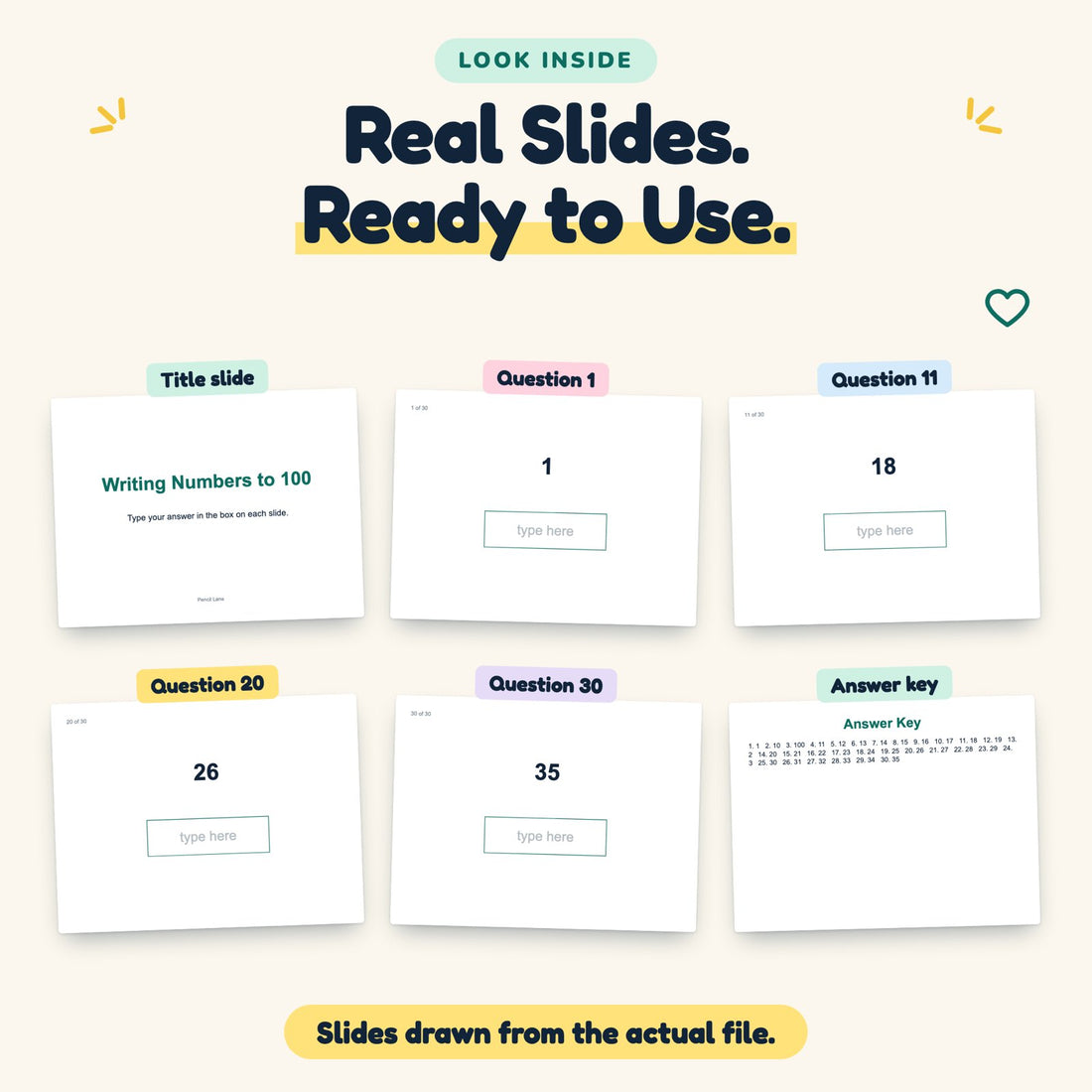
Writing Numbers to 100 for 1st grade: 30 question slides with a type-in answer box, plus an answer key slide.
What’s inside this download
- 30 question slides, one question per slide
- A type-in answer box on every question
- A title slide and an answer key slide at the end
- One .pptx file — opens in Google Slides and PowerPoint
Why choose this over a free activity
- Covers the whole range from 1 to 100
- Targets the decade changes where kids stumble
- Keys show each numeral, so reversed digits like 94 and 49 are easy to spot
- No printing — works on a laptop, tablet or classroom screen
License and file format
- One .pptx file; upload it to Google Drive to open it in Google Slides
- One teacher or one household. Use it with your own students, this year and next
- Sharing the file itself needs a separate license
- Digital download — nothing ships
How do I get the files?
- The download link is on the order page the moment you pay, and in your inbox at the same time
- Re-download from that link any time — no account needed
- Wrong or broken file? Email support@pencillane.com and we fix it or refund you
Why get the bundle
- Writing numbers needs many repeats. Cards, bingo and partner games spread the practice so it does not feel like a single long worksheet.
The problem
Sixty-seven becomes 607
Writing numbers to 100 asks children to turn words and sounds into digits, and place value is only starting to make sense.
Writing what they hear
Sixty-seven can become 607 or 6007 when children write each sound as a separate chunk.
Reversed digits
Children write 94 as 49 because they write the digit they hear first. The tens digit goes on the left.
Losing the pattern at the tens
After 39 comes 40, not 310. The jump between decades is where counting streaks end.
Each card or page gives a number to write, from 1 to 100. Children see each number as a pattern of tens and ones, not just a word.
What’s inside
30 questions, one per slide.
Students type straight into the box — no printing, no cutting.
Writing Numbers to 100
Written for 1st grade.
Title to answer key
A title slide first, the answer key last.
Google Slides & PowerPoint
One .pptx file that opens in both.
Look inside
One question per slide, with a box to type the answer.


How it works
Ready before the printer warms up.
-
1
Download
Check out, and your download link is in your inbox and on screen in seconds. One PowerPoint file you can open in Google Slides.
-
2
Open
Upload it to Google Drive and open it with Google Slides, or open it in PowerPoint.
-
3
Assign
Share it with your class. Students type an answer on each slide, and you check against the key.
Outcomes
Write numbers from 1 to 100
Tens on the left, ones on the right.
- 67
- 9
- 94
- 39
- 82
- 98
- 70
Who it’s for
Built for the kitchen table and the classroom.
Parents & homeschool
Use a hundred chart. Say the number, find it on the chart, then write it. Note which decade changes trip your child.
Teachers
Fits first-grade number work. Use for centers, a quick assessment, or partner counting games.
Writing practice
Students with tidy reading but messy writing can use these to fix reversals.

Questions
Before you buy.
Does it include word-form?
Items give the numeral to write. For number words, see our Number Words sets.
How is this different from Counting to 120?
This one stops at 100. The 120 set goes into the hundreds' first twenty.
How do I get the file?
The download link appears right after checkout and lands in your inbox at the same time. One PowerPoint file you can open in Google Slides.
Can I share it with my class?
Yes — one teacher can use it with their own students, this year and next. Sharing the file with other teachers needs a separate license.
Do I need Google Slides?
No. The file is a PowerPoint (.pptx). It opens in PowerPoint, and in Google Slides once you upload it to Google Drive.
What if it isn’t right for us?
Email support@pencillane.com within 30 days and we refund the full $4.50. No form, no questions.
Write to 100, tens then ones
Writing Numbers to 100 for 1st grade, ready to assign.
Get it — $4.50